Contractor
Operations Features Why us Install Pricing Field notes About Log in
For contractors

Forecasts that know your weather thresholds.

Find work windows tuned to the thresholds that decide your operations — and take the guesswork out of the forecast. Built by a meteorologist for roofing, paving & sealcoating, concrete, general construction, painting, lawn care, and snow & ice removal, to save you the time, material, and man-hours a bad weather call burns.

  • A Go, Caution or Stop for each operation, not one forecast for the whole day
  • Held to that operation’s own limits. Roofing wind isn’t paving temperature isn’t concrete evaporation rate.
  • Built around how long the job takes. A pour needs eight clear hours after it goes down. A sealcoat needs twenty-four. We check the whole window, not just your start time.
  • A heads up before precipitation hits, rain or snow, about half an hour out
  • Alerts that keep you posted. When the forecast shifts far enough to change your answer, when severe weather is 12 to 72 hours out, and official NWS warnings for that site.
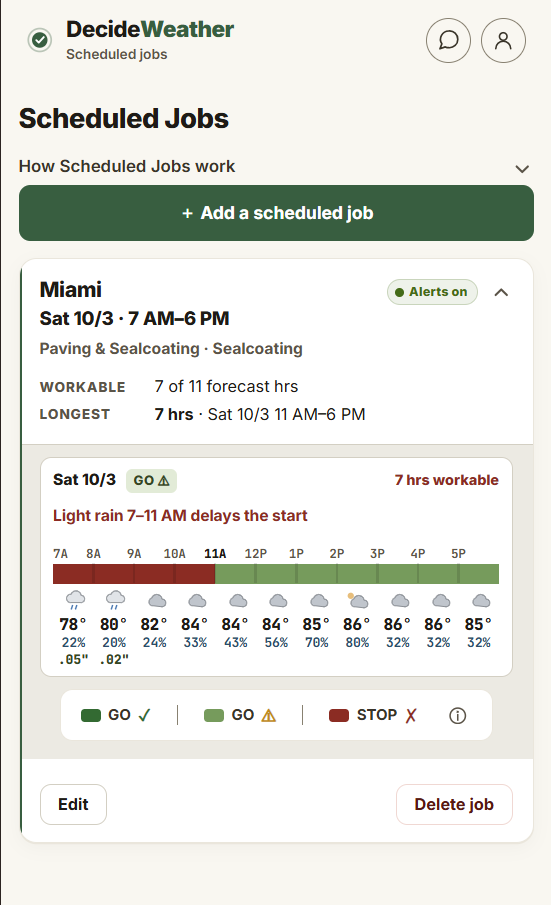
  • Ten days of work windows in one color-coded strip, with the times the recommendation changes marked, so you can see where a multi-day job actually fits
  • Live radar and live conditions at every site
Built by a meteorologist 7 trades, 11 operations No card to start
The two screens you’ll live in

Today’s recommendation, and the next ten days.

Job Sites

What’s happening now, and what’s coming tonight.

  • A separate recommendation for every operation on the site
  • Measured against the thresholds that matter for that job, not a general idea of bad weather
  • Resolved to your exact address, not the nearest town
  • Re-checked as new high-resolution model runs land, all day
  • Already looking at tonight and tomorrow for cure windows and exposed work
  • Live conditions and an NWS radar loop for that spot
Work Windows

Ten days out, hour by hour, per operation.

  • Every day for ten days, not a row of sun and cloud icons
  • Broken out per operation, not one score for the day
  • Shows when the window opens and closes
  • Plan Thursday’s concrete pour on Monday, and book the crew

This is the part people come back for.

The payback

A bad weather call is the most expensive thing on your schedule.

Adverse weather delays 45% of construction projects worldwide, costing owners and contractors billions every year — that's from a peer-reviewed review of 3,200+ studies (Schuldt et al., 2021, Sustainability), not a sales page. The delays you can't control. The bad calls, you can.

Bad call 01

Rain takes a pour

Rain on an unset slab means grinding, resurfacing, or tear-out — industry repair guides put removal and re-pour at $8–20+ per square foot. Do the math on an 800 sq ft pour and a bad call runs five figures. The reschedule was a phone call.

Bad call 02

A coat that doesn't cure

Sealcoat or paint that catches rain before it cures isn't a touch-up — it's the same job twice: strip or re-prep, re-apply, plus the callback and the crew day. One afternoon's guess, double the cost of the job.

Bad call 03

The crew that shouldn't have rolled

Dispatch into weather that shuts the site down and you eat wages, fuel, and the mobilization — industry benchmarks put weather-idled crews at hundreds to thousands of dollars a day, with idle equipment alone at $35–50 per machine-hour.

The other half

The days you stop losing

The workable morning inside a "70% chance" day. The window after the front clears. The pour moved up a day ahead of the freeze. Weather-smart scheduling is won on the days a generic forecast would have scared you out of.

The point One saved pour, one un-redone coat, or one crew held back at the yard pays for a long time on DecideWeather. The forecast is cheap. The guess is not.
What makes us different

Any app can tell you it stopped raining.
None of them tell you when you can work.

That gap is the whole product. The forecast says dry at two o’clock. It doesn’t say whether the slab has cured, whether the deck has dried off enough to coat, or whether last night’s frost is out of the ground yet. Those are the questions that actually decide your day, and answering them means running the clock backward and forward from right now, for each operation separately.

Cure and set windows

Concrete evaporation rate against ACI limits, sealcoat and paint cure conditions. Not “is it raining,” but will it set.

Drying out

We carry what already fell into today’s answer, then work out how long the surface stays wet before it’s workable again.

Overnight into tomorrow

The hours from your workday ending to the next morning. Lows, precipitation that never dried, and frost holding the start until it lifts.

Rainfast and wash-off

Whether an application has long enough to bond before the next round comes through, or whether you just paid to water the lawn.

Exposed work overnight

What you’re leaving open tonight, and what the night is going to do to it before the crew gets back.

Ten days of it

All of the above, every day, for the next ten. So you’re scheduling around it instead of reacting to it.

The difference A weather app answers what will the weather be. This answers can this crew do this job, and for how long.
7 trades, 11 operations

Your trade isn’t one setting. It’s a list of different jobs.

Tear-off and a repair don’t share a wind limit. Paving and sealcoating don’t share a temperature. So every operation gets its own limits and its own answer, on the same site, on the same afternoon.

The DecideWeather app showing a Roofing job site, with a separate call for each operation

Roofing

2 operations

Sustained wind and gust limits, precip timing, and dry-in windows for tear-off and shingle work.

Install / Tear-off
Sustained wind & gustsPrecip timingTemperatureVisibility & fogAir quality
Repair
The same signals, at the more forgiving limits a patch can live with
The DecideWeather app showing a Paving & sealcoating job site, with a separate call for each operation

Paving & sealcoating

2 operations

The mat-cooling clock for a clean lay-down, plus surface temperature and dew point for the cure. Two operations in one trade, each tuned to your site.

Paving
Surface & mat temperaturePrecip timingWet surfaceFrozen subgradeSoil saturationWindVisibility
Sealcoating
Cure temperatureHumidity & dew pointWash-off before it setsWet surface & dry-backPrecip timingWindVisibility
The DecideWeather app showing a Concrete job site, with a separate call for each operation

Concrete

1 operation

Evaporation rate, worked out from air temperature, humidity and wind, so pours do not crack.

Pour
Evaporation rateFreeze riskFrozen subgradeWash-off on fresh concretePrecip timingTemperatureWindVisibility
The DecideWeather app showing a General construction job site, with a separate call for each operation

General construction

2 operations

Overlapping windows for framing, sitework, and exterior trades on one shared timeline.

Above Ground
Sustained wind & gustsPrecip timingSnow & ice accumulationTemperatureVisibility & fog
Ground Work
Soil saturation, so you know the ground will holdFrozen subgradePrecip timingWindTemperatureVisibility
The DecideWeather app showing a Painting job site, with a separate call for each operation

Painting

1 operation

Dew point and the temperature spread that decide whether an exterior coat actually cures.

Painting
Dew point & humidityCure temperatureWash-off before the coat setsPrecip timingWind
The DecideWeather app showing a Lawn care job site, with a separate call for each operation

Lawn care

2 operations

Soil saturation for the mowing call, and the rainfast window before fertilizer and spray applications wash off.

Mowing
Soil saturation, ruts and scalpingFrozen groundPrecip timingTemperature
Fertilize
Rainfast window before wash-offSoil saturationWind for driftPrecip timingTemperature

Snow & ice removal

1 operation

Pavement temperature and precip timing for the treat-and-plow window before the freeze.

Snow Ops
Pavement temperaturePrecip type & changeoverAccumulation rateRefreeze risk
Alerts

We’ll tell you when something changes.

Three kinds pushed to your phone, plus official NWS warnings in the app’s alert list.

01

Precipitation moving in

Rain, snow or ice, about a half hour before it reaches the site. Then another when it’s clearing and there are enough dry hours behind it to head back out.

02

Forecast change alerts

Forecasts move. When one moves far enough to change the answer for one of your operations, you hear about it. Not every wiggle in a number.

03

Extreme weather alerts

Heavy rain, heavy snow, high wind, extreme heat and cold. Usually 12 to 72 hours ahead, so there’s time to move a crew or a delivery.

04

Official NWS warnings, in the app

Warnings, watches and advisories from the National Weather Service for that job site, right in the app’s alert list next to everything else.

The assistant

Just ask it.

Type the question the way you’d say it out loud and get a straight answer back.

  • Knows your sites and the operations on them
  • Answers from your real forecast, so it matches the screen
  • Remembers the thread, so “what about Friday?” works
  • Not a chatbot bolted on. Same data as the rest of the app
Radar

Look at the radar all you like.
You just won’t have to.

There’s a live NWS radar loop on every job site. The difference is the app is watching it too, at every site at once, and has already worked out what that cell means for the job.

Radar is in the answer

Live radar and nowcast feed the recommendation, the hour strip, the windows and the alerts. When the radar changes, so do they.

Every site, not one

It checks all your sites and speaks up about the one that’s actually going to be hit.

It knows what counts

A light shower that won’t wet a surface isn’t worth a phone buzz. How hard, how long, how much.

Inside the app

Four taps to your whole week.

DecideWeather Job Sites screen
Job SitesNow

Today’s recommendation for the site, and a separate call for each operation running on it.

DecideWeather Hour by hour screen
Hour by hourNow

The same site opened up: the hourly scroller and the next three days.

DecideWeather Work Windows screen
Work Windows10-Day

Ten days in one color-coded strip, per operation. The screen you plan around.

DecideWeather Alerts screen
AlertsLive

Precipitation moving in, the forecast shifting, severe weather coming, NWS warnings.

DecideWeather Settings screen
SettingsAccount

Your trades, operations, working hours and alerts. Set it once.

How it’s built

The best available data, then a lot of work on top of it.

We use the newest and most accurate forecast models available and blend them ourselves. Then a meteorologist mapped all of it onto what each operation can and can’t take.

Source 01

The latest high-resolution models

The newest, most accurate models we can get, blended, so one bad run never drives your recommendation.

Source 02

National Weather Service

Official NWS forecasts in every outlook, and NWS warnings straight through as alerts.

Source 03

Live radar and nowcast

Radar and short-range projections for the next few hours, where job-site timing is won or lost.

Source 04

Current and past conditions

Live observations at your site, plus what already fell, because yesterday changes today.

Source 05

Our own blending

Custom logic pulls it into one picture for your exact address, not a regional average.

Source 06

Thresholds per operation

Checked against the limits for the job in front of you. Wind, temperature, dew point, soil, rainfast, cure.

Built by a meteorologist Blended for your site  →  checked against each operation’s limits  →  an answer you can hand to a foreman.
Get the app

Install DecideWeather in seconds.

It's a web app — no app store, no download wait. Add it to your phone's home screen and it opens and works just like a native app. Free for two weeks, no card.

iPhone & iPad
  1. Open app.decideweather.com in Safari or Chrome
  2. Tap the Share button — bottom of the screen in Safari, top right in Chrome. Same icon in both.
  3. Choose Add to Home Screen
  4. Open DecideWeather from your home screen — done
Android
  1. Open app.decideweather.com in Chrome
  2. Tap the menu (top right)
  3. Choose Install app or Add to Home screen
  4. Open DecideWeather from your home screen — done
Open the app to install Works on iPhone, Android, and desktop browsers · No app store needed
Questions

Weather software for contractors, answered.

Is there a weather app for contractors?

Yes. DecideWeather is built for outdoor contractors, covering roofing, paving & sealcoating, concrete, general construction, painting, lawn care, and snow & ice removal. It turns the forecast into a simple Go, Caution or Stop recommendation and an hour-by-hour work window for each operation you run, at each of your job sites.

How far ahead can I plan?

Ten days, and not just as a daily forecast. You get working windows for every day, broken out by operation, so you can look at next Thursday on Monday and schedule the concrete pour, the sealcoat or the tear-off around it.

Does it have live radar?

Yes. Every job site has a live NWS radar loop and current on-site conditions, right there when you want to look. The app reads that same radar and nowcast data itself, so your recommendation, your hour strip and your alerts stay current with what the radar is actually showing.

What kind of alerts does it send?

Three kinds get pushed to your phone. Precipitation moving in at a site, rain or snow, and a heads up when it is clearing. Forecast change alerts when the outlook shifts enough to change the answer for one of your operations. And extreme weather alerts for heavy rain, heavy snow, high wind and extreme heat or cold, usually 12 to 72 hours ahead. Official NWS warnings, watches and advisories for each site appear in the app’s alert list alongside them.

Will it wake me up for nothing?

We try hard not to. Alerts are held to the hours your crews actually work, and light passing showers that will not wet a surface do not qualify. Forecast change alerts only fire when the forecast crosses a line that changes your answer, not every time a number moves a little.

Which trades does DecideWeather support?

Roofing, Paving & sealcoating, Concrete, General construction, Painting, Lawn care, Snow & ice removal. That is 7 trades and 11 separate operations, each with its own thresholds, from roofing wind limits to concrete evaporation rate to the soil saturation that decides whether ground work can run.

Does it account for drying and cure time?

Yes, and this is a big part of it. A dry hour is not always a workable hour. The app carries the precipitation that already fell into today’s recommendation, then looks forward through drying and cure. That covers concrete evaporation rate, sealcoat and paint cure conditions, how long a paved surface takes to dry off, and the rainfast window before an application washes off.

Does it look at overnight weather?

Yes. It reads the overnight hours from the end of your workday through the next morning, because that is often what decides whether tomorrow starts on time. An overnight low, a surface that never dried, or a frost that holds the crew until it lifts.

How is it different from a regular weather app?

A normal weather app tells you the weather. It does a good job of that, but it does not know what you do for a living, so you are left working out what 14 mph or a 40% chance means for tear-off. DecideWeather already knows the limits for each operation you run and checks every hour of the forecast against them, at your exact job site.

What is the assistant?

A built-in assistant you can ask normal questions, like “can we pour at Riverside Thursday?” It knows your job sites and the operations on them, and it answers from the same forecasts, verdicts and work windows the rest of the app is built on, so it agrees with what you see on screen. It also remembers the conversation, so you can follow up with “what about Friday?”

Who built it?

A meteorologist. We use the newest and most accurate forecast models available and blend them ourselves, and the thresholds behind each operation were built from scratch for outdoor work rather than adapted from a consumer weather app.

Does it work on iPhone and Android?

Yes. DecideWeather is a web app you install on your phone’s home screen on iPhone, Android or desktop. There is a 2-week free trial and no app store needed.

Ready when your crew is

Two weeks free. No card.

Add your job sites, tick the operations you run, and see what the next ten days look like for the work you actually do.

The DecideWeather Job Sites screen, enlarged
×
DecideWeather Job Sites screen, enlarged
×
DecideWeather Hour by hour screen, enlarged
×
DecideWeather Work Windows screen, enlarged
×
DecideWeather Alerts screen, enlarged
×
DecideWeather Settings screen, enlarged
×
The DecideWeather app showing a Roofing job site, enlarged
×
The DecideWeather app showing a Paving & sealcoating job site, enlarged
×
The DecideWeather app showing a Concrete job site, enlarged
×
The DecideWeather app showing a General construction job site, enlarged
×
The DecideWeather app showing a Painting job site, enlarged
×
The DecideWeather app showing a Lawn care job site, enlarged
×