Know if your crew
can work — before
they roll out.
DecideWeather turns the forecast into a clear Go / Caution / Stop recommendation for every outdoor work operation — tuned to your exact job site and the conditions that affect whether your crew can work.
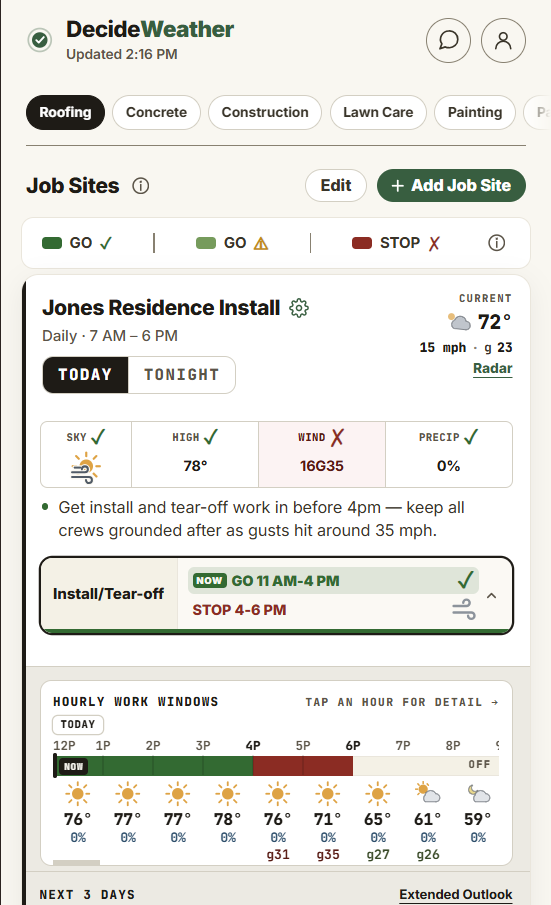
Every recommendation, tuned to the work you actually do.
Pick your operations and set your job sites. From there, every forecast is checked against the exact conditions that affect whether each one can run.
Construction & exteriors
Rain, wind, temperature, dew point, and drying time — modeled per operation so you know the working window before you dispatch the crew or load the truck.
Not your typical weather forecast.
Four things that turn a raw forecast into clear guidance your whole crew can run on.
Instant timing guidance
A Go / Caution / Stop recommendation for each work operation, at every job site. Add unlimited sites and set the hours your crews actually work.
Detailed work-window planning
See exactly when each operation can start, run, and finish — broken down hour by hour, so nobody loads the truck for a window that won't hold.
Real-time alerts at every site
Know the moment the forecast shifts far enough to affect your workable hours on a job — plus weather hazards, incoming precip, and official NWS warnings, watches, and advisories.
Custom-built by a meteorologist
We pull the best forecast data from multiple sources and run it through custom algorithms — built from the ground up for outdoor work, around the thresholds that matter for whether your crew can work.
Other apps report the weather.
We make it clear.
Consumer weather apps were built for "should I bring a jacket?" — not "can my paving crew run today?" or "can we pour Thursday?" That gap is the whole product — and it's a money gap: adverse weather delays 45% of construction projects worldwide (Schuldt et al., 2021), and the cost of a bad call is measured in idle crews, wasted material, and work done twice.
Better inputs, clearer guidance.
We don't lean on a single forecast. We blend the best available data and run it through algorithms built for the way outdoor work actually happens.
Multiple model blends
We combine several forecast models instead of trusting one — so a single bad run never drives your recommendation.
NWS forecasts
Official National Weather Service guidance and products, woven into every site-level outlook.
Nowcast & radar
The latest nowcasting and radar technology for the next few hours — where job-site timing lives or dies.
Current & past conditions
Live observations and recent history — because what already fell on the ground changes today's window.
Custom blending algorithms
Our own logic merges every source into one coherent picture for your specific location.
Operation-specific thresholds
Output mapped to the limits that matter for each operation — wind, temp, dew point, rainfast, drying time.
A weather app built by a meteorologist, for outdoor work.
DecideWeather started with a simple frustration: every weather app on the market answers "what's the weather?" — but nobody who runs an outdoor crew is asking that. They're asking "can we work today, and for how long?"
So we built the app around the recommendation instead of the raw data. We pull the best forecast sources, blend them with custom algorithms, and check the result against the specific thresholds that affect whether a roof crew, a paving rig, or a pour can run — operation by operation, hour by hour.
It's the tool we wished existed: forecasts that actually know your work.
Meteorology · Software · Outdoor work
Field notes on weather & work.
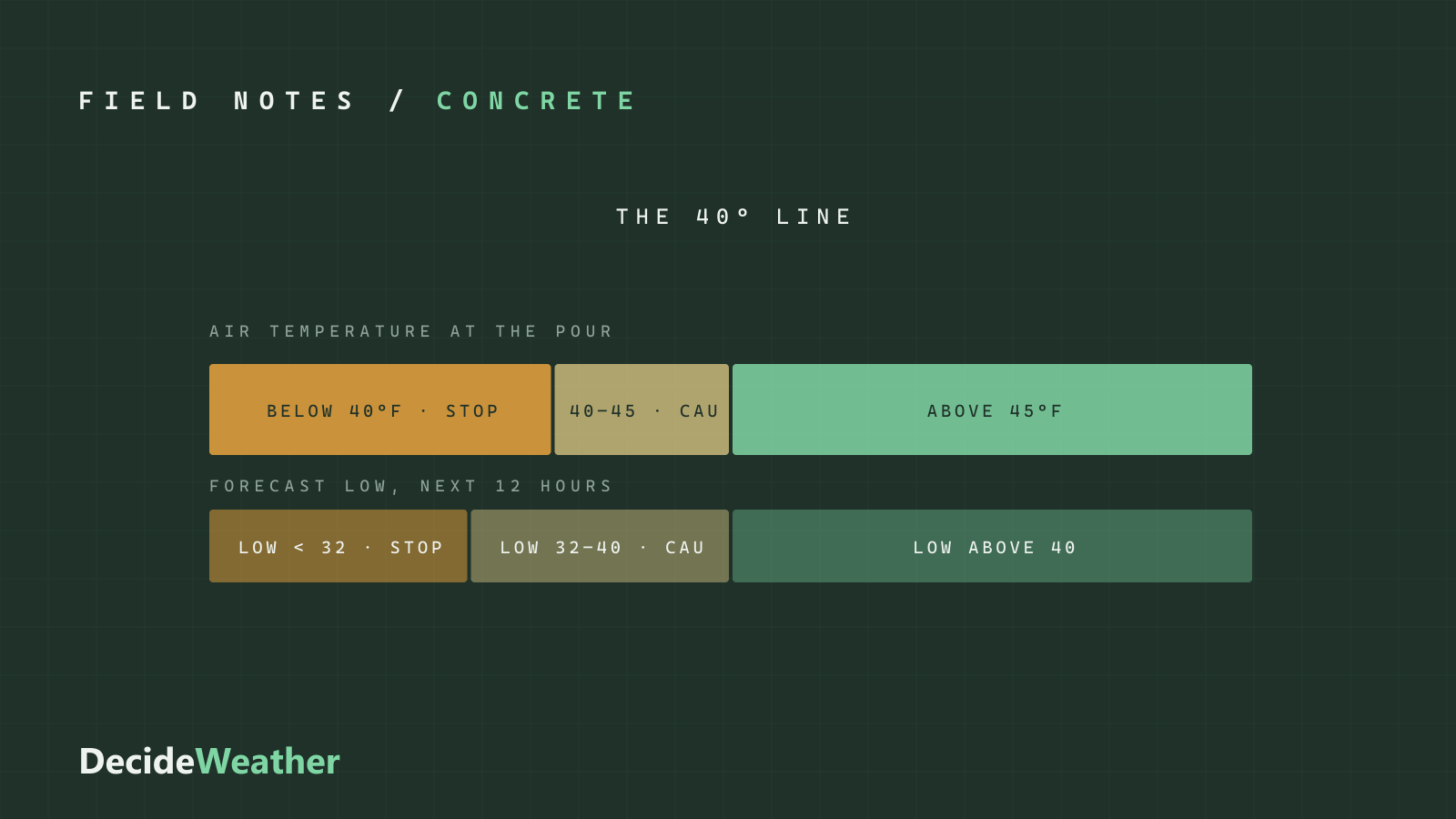
How cold is too cold to pour concrete? The 40°F line and the 12-hour low
ACI defines cold-weather concreting at 40°F, but the pour-time temperature is only half the answer. The thresholds, what cold does to strength gain, and the 12-hour look-ahead.
Read the breakdownCan you pave on a wet base? Soil saturation, proof rolling, and the week after rain
Asphalt is only as good as what's under it. Why saturated subgrade pumps and ruts, why clay stays wet for days while sand drains, and how to judge the base after rain.
Mowing frosty grass: why the first frosts hold the mowers
Frozen grass blades break under wheels and feet, and the damage shows up as brown tracks days later. When frost forms, how long to wait, and when the ground itself is frozen.
Wildfire smoke and roofing crews: the AQI numbers that change the workday
Heavy work on a roof means heavy breathing, and in smoke that means heavy PM2.5 exposure. What each AQI level means for a roofing crew, and where state rules step in.
How long after rain can you paint exterior siding?
The rain stops long before the siding dries. How moisture content, shade, and fall weather set the wait after rain, and why the next few hours matter as much as the last few.
Install DecideWeather in seconds.
It's a web app — no app store, no download wait. Add it to your phone's home screen and it opens and works just like a native app. Free for two weeks, no card.
- Open app.decideweather.com in Safari or Chrome
- Tap the Share button — bottom of the screen in Safari, top right in Chrome. Same icon in both.
- Choose Add to Home Screen
- Open DecideWeather from your home screen — done
- Open app.decideweather.com in Chrome
- Tap the ⋮ menu (top right)
- Choose Install app or Add to Home screen
- Open DecideWeather from your home screen — done
Weather software for outdoor work, answered.
Is there a weather app for contractors?
Yes. DecideWeather is built for outdoor contractors — roofing, paving & sealcoating, concrete, general construction, painting, lawn care, and snow & ice removal. It turns the forecast into a Go / Caution / Stop recommendation and an hour-by-hour work window for each operation, tuned to your exact job site.
How is DecideWeather different from a regular weather app?
Consumer weather apps report temperature and a percent chance of rain. DecideWeather checks the forecast against the specific thresholds that matter for each operation and shows a clear recommendation and an hour-by-hour work window, tuned to your exact site.
What weather data does DecideWeather use?
We blend multiple forecast models with National Weather Service guidance, the latest nowcast and radar, and current and past conditions, then run them through custom algorithms mapped to each operation’s thresholds.
Does DecideWeather work on iPhone and Android?
Yes. DecideWeather is a web app (PWA) you install on your phone’s home screen on iPhone, Android, or desktop — no app store needed.
How much does DecideWeather cost?
DecideWeather starts with a 2-week free trial with full features, so you can set up your job sites and operations before deciding.
Know if your crew can work.
It’s like having your own weather consultant — one who knows every job’s weather limits, watches the forecast around the clock, and tells you the moment something changes. Free for two weeks — no card to start.